OpenMANET 5 GHz: Bonding a Second Band Into the Mesh (Results, Breakage and What’s Left)

The two Alfa adapters showed up today, so the dual-band plan stopped being a plan. I spent the day adding OpenMANET 5 GHz links to both bench nodes, changing the routing stack to suit, and running every speed, failover and power test I could think of. Some of it worked better than I hoped. One part locked a node up hard. Here’s all of it, plus what’s still left to test.
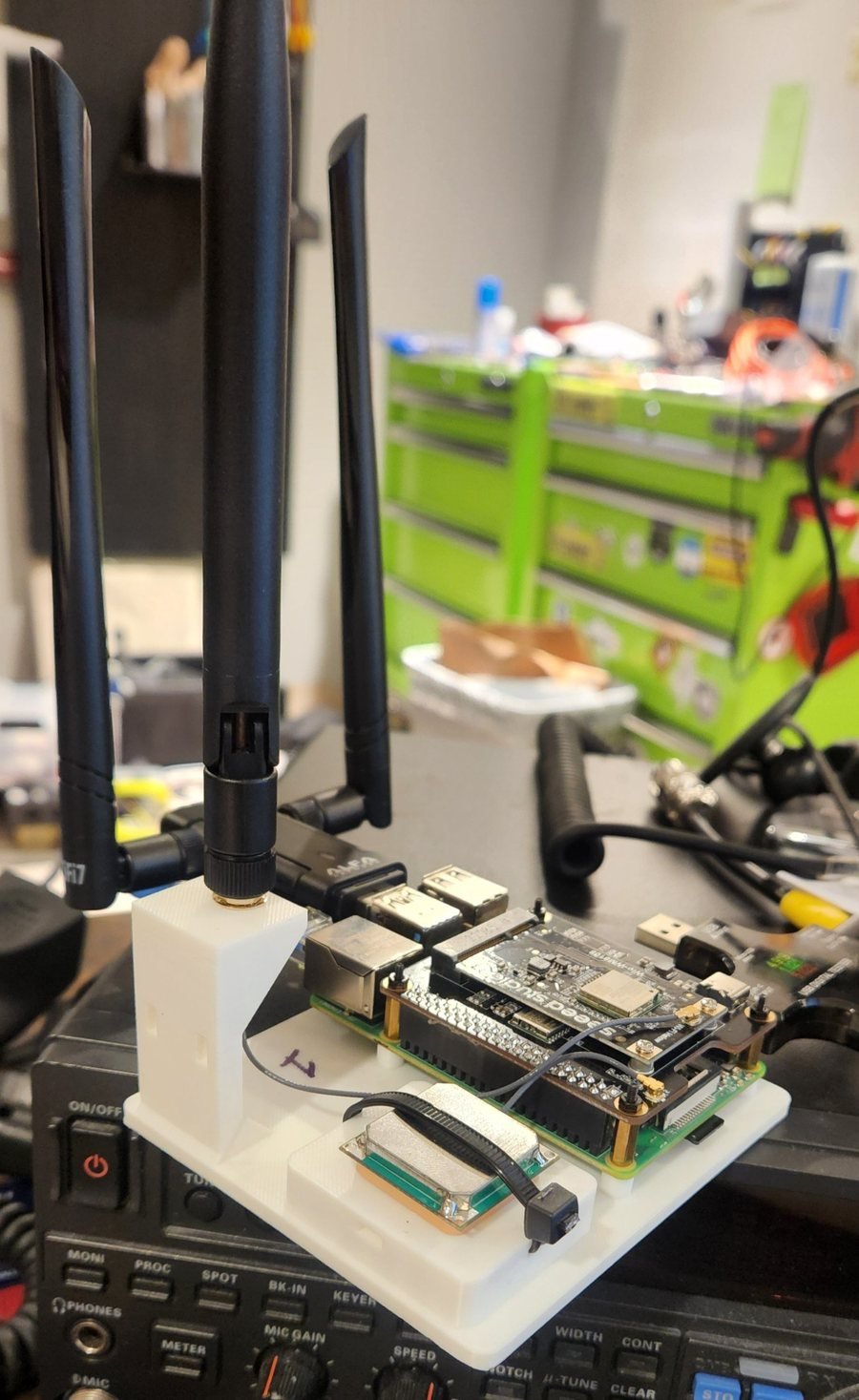
Raspberry Pi 4 OpenMANET node on its printed test stand with the HaLow HAT, 915 MHz antenna, GPS and the Alfa 5 GHz USB adapter plugged into a blue USB 3 port

Node 1 on its test stand, with the Alfa 5 GHz adapter riding in a blue USB 3 port.

The hardware: a stand-in 5 GHz radio

The handheld will use an MT7916 card on PCIe. The Pi 4 only has USB, so for bench testing I’m using an Alfa AWUS036ACM (MediaTek MT7612U) on each node. That chip uses the mainline mt76 driver and supports 802.11s mesh point mode, which is the whole point. The Pi’s onboard Wi-Fi stays as the client access point on channel 36.

What I changed in the OpenMANET routing stack

Everything sits on top of stock OpenMANET 1.8.0. Nothing in the core is forked, so a stock node still joins the HaLow mesh like normal.
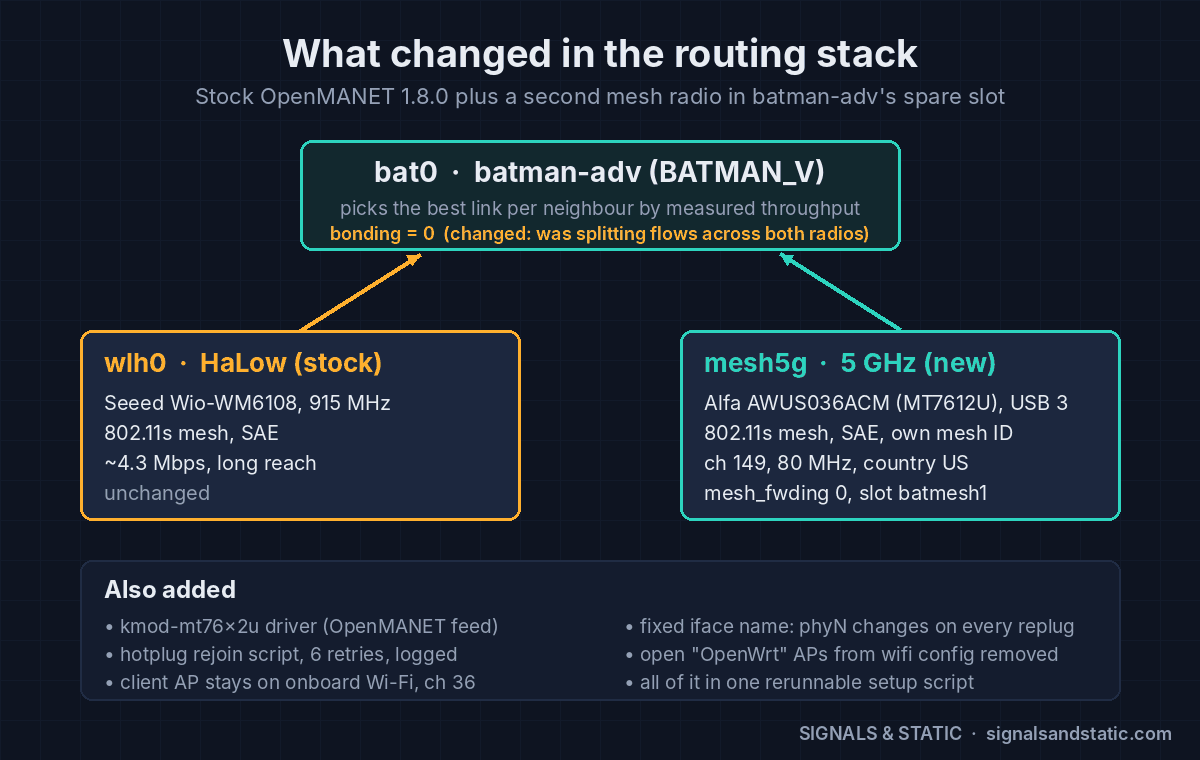
OpenMANET 5 GHz routing stack diagram: batman-adv bat0 with bonding off, the stock HaLow wlh0 interface and the new mesh5g 5 GHz interface on channel 149

One batman-adv mesh, two radios: stock HaLow plus the new mesh5g interface.

Change Why
Installed kmod-mt76x2u from OpenMANET’s package feed The Alfa’s driver isn’t in the 1.8.0 image.
Radio set to country US, channel 149, 80 MHz Without a country code, every 5 GHz channel is listen-only. Channel 149 (UNII-3, no DFS) stays well clear of the client AP on 36.
New 802.11s interface, mesh5g: SAE-encrypted, its own mesh ID, mesh_fwding 0 batman-adv does the multi-hop forwarding, so the Wi-Fi layer shouldn’t.
Attached to batmesh1, OpenMANET’s spare bat0 slot Both radios become interfaces of the same mesh. BATMAN_V scores each link by measured throughput and picks per neighbor.
Fixed interface name The phy number changes every time a USB radio is replugged, which broke everything keyed to it.
bonding = 0 on bat0 With bonding on, batman split transfers across both radios and lost about 35% of the speed (see below).
Removed the open “OpenWrt” access points that wifi config creates They’d broadcast an unsecured network.
Hotplug rejoin script, kept across firmware upgrades The Alfa doesn’t rejoin the encrypted mesh on its own after a replug. The script retries up to six times and logs each attempt.

All of that now lives in one setup script that’s safe to rerun (it has to be after a firmware upgrade, which drops the driver package) and a matching removal script that puts a node back to HaLow only.

Speed: OpenMANET 5 GHz vs HaLow

Nodes about a room apart, 5 GHz signal around −49 to −51 dBm, PHY rates 526–702 Mbps:
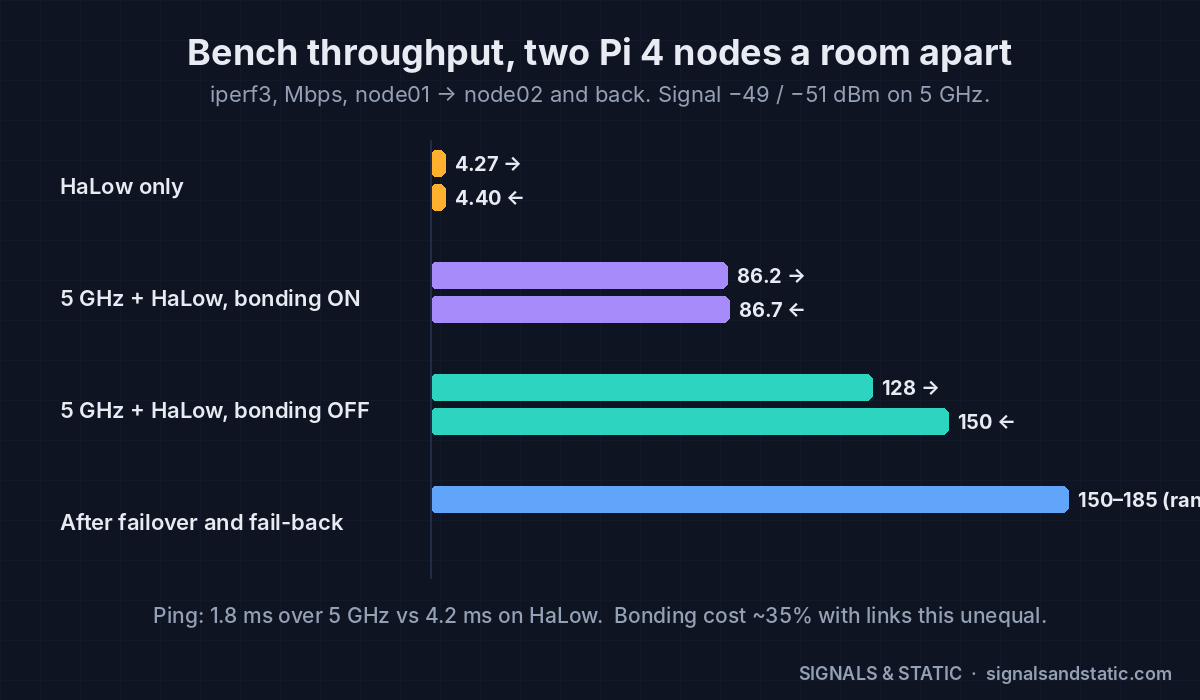
OpenMANET 5 GHz throughput chart: HaLow alone about 4.3 Mbps, 5 GHz with bonding on about 86 Mbps, bonding off 128 to 150 Mbps, after fail-back 150 to 185 Mbps

Bench throughput between the two nodes. Turning bonding off was worth about 35%.

Setup node01 → node02 node02 → node01
HaLow only 4.27 Mbps 4.40 Mbps
5 GHz + HaLow, bonding on 86.2 Mbps 86.7 Mbps
5 GHz + HaLow, bonding off 128 Mbps 150 Mbps
Ping 1.8 ms over 5 GHz vs 4.2 ms on HaLow

Roughly 30–35 times faster up close, which is exactly the “fast when close, long when far” idea. Radio retries were about 3%.

Why bonding hurt: bonding round-robins packets across every link to a neighbor. When one link is 30× slower than the other, the slow one drags the whole transfer down. With bonding off, batman just uses the best link, and the HaLow link sits there as the fallback.

Failover and fail-back

With a ping running once a second, I killed the 5 GHz radio and watched what batman did.
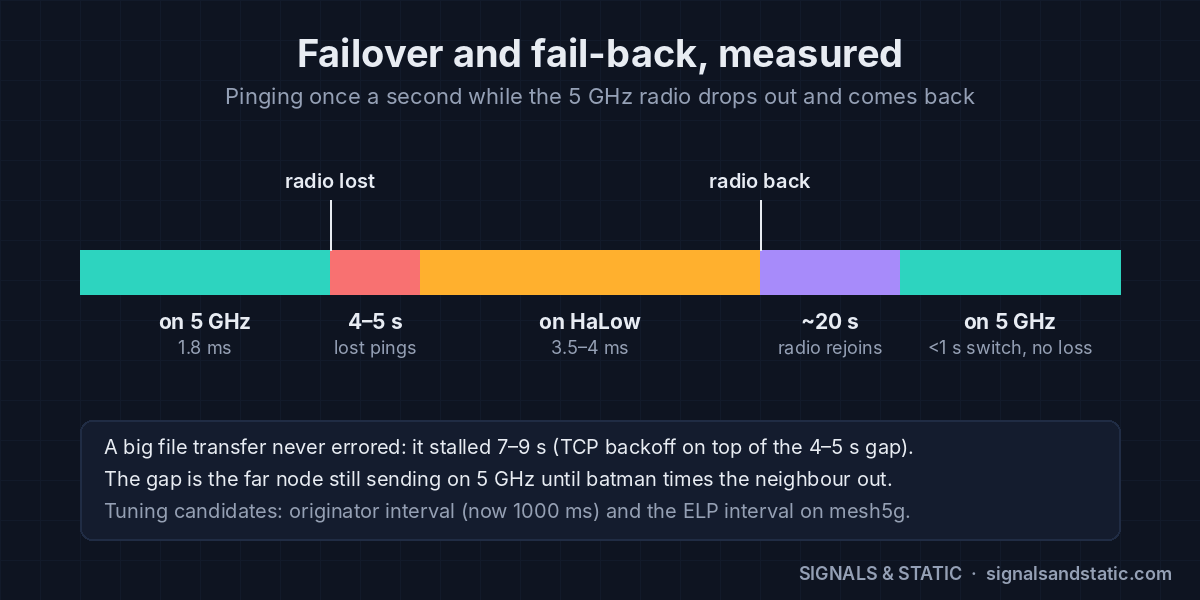
OpenMANET 5 GHz failover timeline: 4 to 5 seconds of lost pings when the 5 GHz radio drops, running on HaLow, about 20 seconds to rejoin, then back on 5 GHz in under a second with no loss

Failover to HaLow costs 4–5 s; failing back costs nothing once the radio has rejoined.

  • Failover to HaLow: 4–5 seconds of lost pings, then steady on HaLow at 3.5–4 ms. The gap is the far node still sending over 5 GHz until batman times out that neighbor.
  • Transfers survive: a running iperf transfer never errored. It stalled 7–9 seconds (TCP backing off on top of the routing gap) and then kept going on HaLow.
  • Fail-back: once the 5 GHz neighbor reappears, batman moves the live transfer back within a second, with no loss. The slow part is the radio rejoining the encrypted mesh, about 20–23 seconds after it comes back.

The hardships

1. Too close is too loud

With the two Alfas side by side, the signal was −23 dBm and the receivers overloaded. One direction collapsed to 12.7 Mbps with heavy retransmits. Moving the nodes a room apart fixed it. The sweet spot on the bench is −40 to −60 dBm.

2. ip link down/up doesn’t rejoin the mesh

Bouncing the mesh interface the Linux way leaves it down as far as the encrypted mesh is concerned. Use wifi, or batctl if del/add to pull it out of batman instead.

3. The adapter wouldn’t rejoin after a replug

The first hotplug script brought the Alfa back two times out of three. The second version retries up to six times, checks that the interface is really up before it quits, and logs every attempt.

4. A kernel lockup from pulling the USB radio

This was the big one. On roughly the fourth hot-unplug, node 1 locked up. The Alfa’s driver timed out with traffic still queued, then the node’s attempt to remove mesh5g from bat0 hung inside the kernel and couldn’t be killed. Every batman query after that piled up behind it: load average hit 2,188, the web UI sat on “Loading…”, and the rejoin script never got to run. SSH still worked, which is how I caught the evidence before a forced reboot.

It looks like a race between a USB radio vanishing and batman removing it (batman-adv 2025.4, mt76x2u, OpenMANET 1.8.0). It happened about one unplug in four.

Does it matter? Not for the handheld: the MT7916 is a PCIe card, and you can’t yank it out of a running radio. In the field, links fail by going out of range, and batman handles that cleanly. But for the Pi-based base and vehicle units that will keep using USB adapters, the rules are now: power off before unplugging, and strain-relieve the cable so a bump can’t pull it.

5. Smaller gotchas

  • Saving the Wireless page in the OpenMANET web UI can rewrite the wireless config and drop mesh5g. Don’t.
  • Any wifi command drops the web terminal session. Refresh and log back in.

Coexistence and real-world traffic

I ran a phone speed test to the internet through the mesh (node 1 is the gate on my home connection):

Phone connected to Down Up Ping
Node 1’s AP (direct to the gate) 81.6 Mbps 37.5 Mbps 15 ms
Node 2’s AP (AP ch 36 → 5 GHz mesh ch 149 → gate) 68.8 Mbps 13.2 Mbps 16 ms
Node 2’s AP, with a bulk transfer running 4.8 Mbps 2.9 Mbps –

The client AP on channel 36 and the mesh on channel 149 coexist fine on one node. Two things don’t add up yet:

  • Upload through node 2 is low (13.2 Mbps) even though the phone’s own link was 390 Mbps. My first suspect is fragmentation or MTU on the 5 GHz mesh interface.
  • One bulk flow starves everything else. With a 157 Mbps transfer running, the phone dropped to under 5 Mbps. My best guess: batman wraps all traffic to a neighbor in one outer header, so the Wi-Fi driver’s per-flow fair queuing sees a single giant flow.

Push-to-talk under load: clean

The good news: browser PTT between the nodes stayed clear both ways during a 90-second transfer, and the transfer still ran at 133 Mbps. PTT is multicast, and batman floods multicast out of both radios, so a copy of every voice packet rides the idle HaLow link and the far node plays whichever arrives first. Voice is protected today. Unicast traffic like ATAK, video and phone internet is not. And flooding every voice packet on both bands won’t scale forever, so that gets revisited with more nodes.

Power
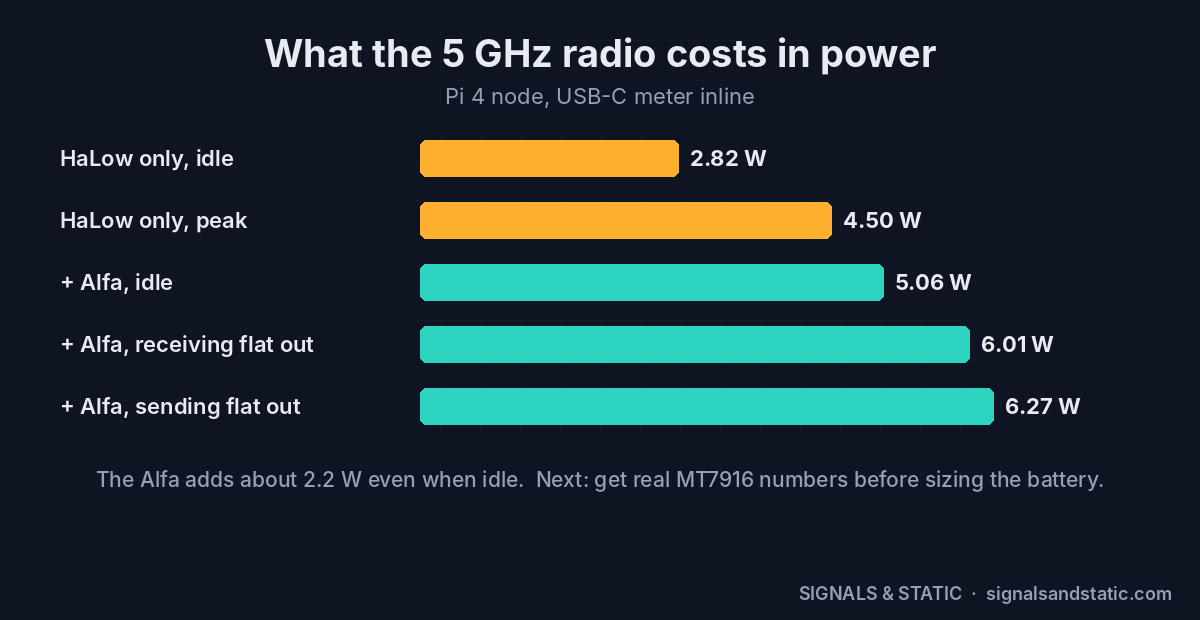
Power draw chart for an OpenMANET Pi 4 node: 2.82 W idle on HaLow only, 5.06 W idle with the Alfa 5 GHz adapter, up to 6.27 W sending at full speed

The 5 GHz adapter adds about 2.2 W even sitting idle.

With a USB-C meter inline on node 1: 5.06 W idle with both meshes up, 6.01 W receiving flat out, and 6.27 W sending flat out. Without the Alfa it was 2.82 W idle. That ~2.2 W idle cost matters for the handheld: on the battery I’ve been sketching, it could cut idle runtime from roughly 9 hours to 5 if the MT7916 draws like the Alfa. So I need real MT7916 numbers before the pack size is final. Shutting the 5 GHz radio down when no 5 GHz neighbors are around is on the idea list.

Remaining tests

  1. Prove the scripts: remove 5 GHz from node 2 with the removal script, then add it back from the gate with one command.
  2. Boot without the 5 GHz radio and mix with a stock node: the node with its radio removed acts as stock OpenMANET. The mesh and PTT need to keep working with no route flapping. The script test above covers this too.
  3. Upload and MTU check: track down the low upload through node 2.
  4. Voice bitrate: run PTT at higher Opus bitrates over 5 GHz vs HaLow. This is groundwork for the adaptive-voice idea.
  5. Outdoor walk test with GPS logging: carry node 2 away from the house while talking. It shows where 5 GHz hands off to HaLow and back, whether the audio hiccups during a soft failover, and finally gives me a HaLow range baseline.
  6. Save everything and reset: configs and logs off both nodes, nodes back to a known state.

Open issues to chase after that: the bulk-flow starvation (check whether voice packets carry DSCP EF so the Wi-Fi voice queue can help), tuning the 4–5 second failover gap (the originator interval is 1000 ms, and the ELP interval on mesh5g is a candidate), and MT7916 power figures.

Dropped: the USB 2 vs USB 3 comparison. Every future Pi unit will run its Alfa from a blue USB 3 port anyway, and moving the adapter means redoing the radio config for the new port.

—
TL;DR: A 5 GHz mesh link bonded into batman-adv next to HaLow (bonding off) took the bench nodes from 4.3 Mbps to 128–185 Mbps. Failover to HaLow costs 4–5 seconds, and transfers survive it. Pulling the USB radio from a running node can lock up the kernel, which the PCIe handheld won’t care about. Bulk traffic starves other users, but PTT stays clean because it rides both bands. Next up: script tests, stock interop, MTU, voice bitrate and an outdoor walk test.
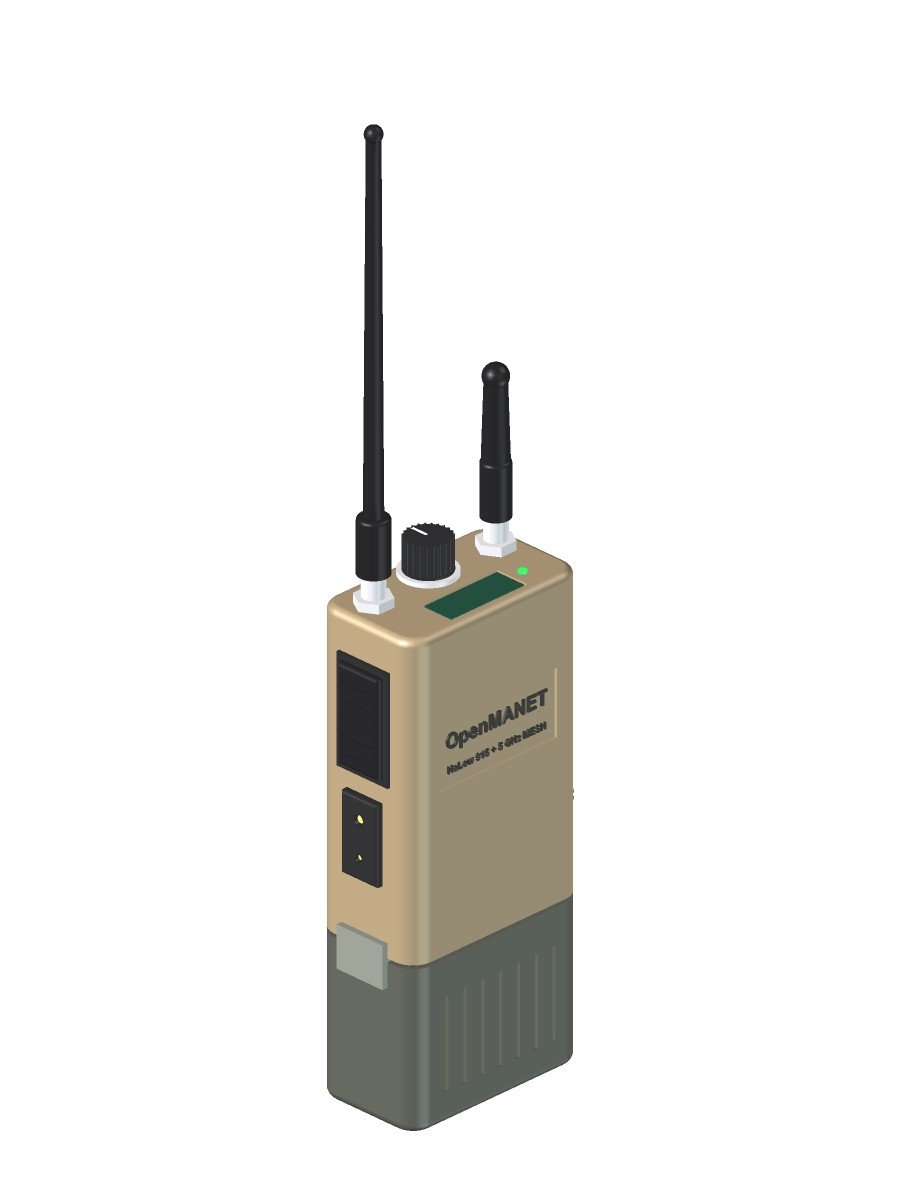
The OpenMANET Handheld, Rendered: A CM4 Concept in FreeCAD

With two nodes meshing on the bench (part 4), I wanted to actually see the thing I keep describing. So I modeled the OpenMANET handheld in FreeCAD from every decision I’ve made so far and rendered it from all sides. This is a concept. The real dimensions get set by the CM4 carrier board, which doesn’t exist yet, so expect the body to change. But it’s a lot easier to argue with a picture than with a bullet list.

OpenMANET handheld concept render, three-quarter view: flat dark earth body with 915 MHz HaLow whip and 5 GHz stub antennas, channel knob, top status screen, side PTT and Kenwood 2-pin jack, battery pack below

Three-quarter view: PTT and Kenwood 2-pin jack on the left side, screen and channel knob up top.

The OpenMANET handheld envelope

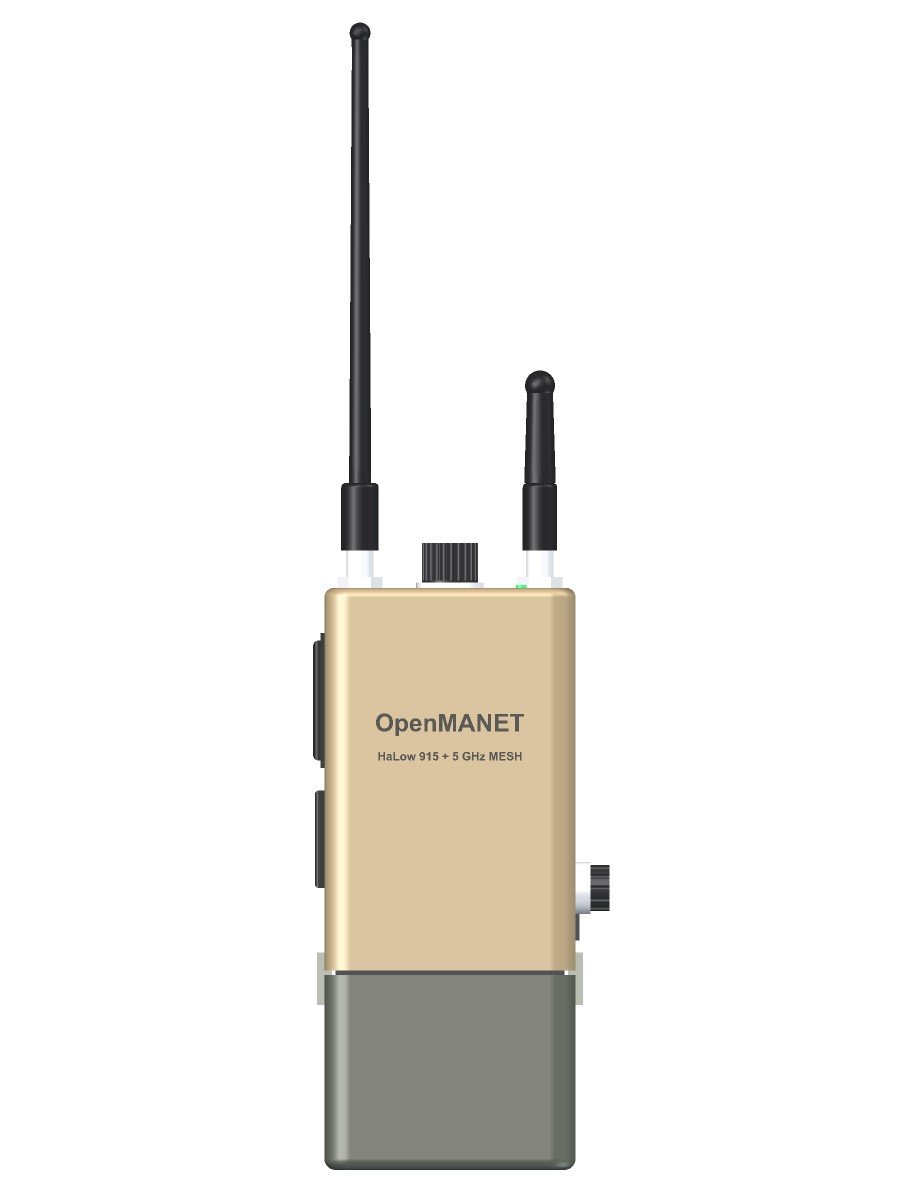
The size target is Silvus SC4200EP territory: a body about 102 × 67 × 38 mm before connectors, with the battery hanging off the bottom. Yes, it’s tacticool. I’ve made my peace with that.

  • Printed shell, flat dark earth ASA. ASA because it handles sun and heat better than PLA or PETG.
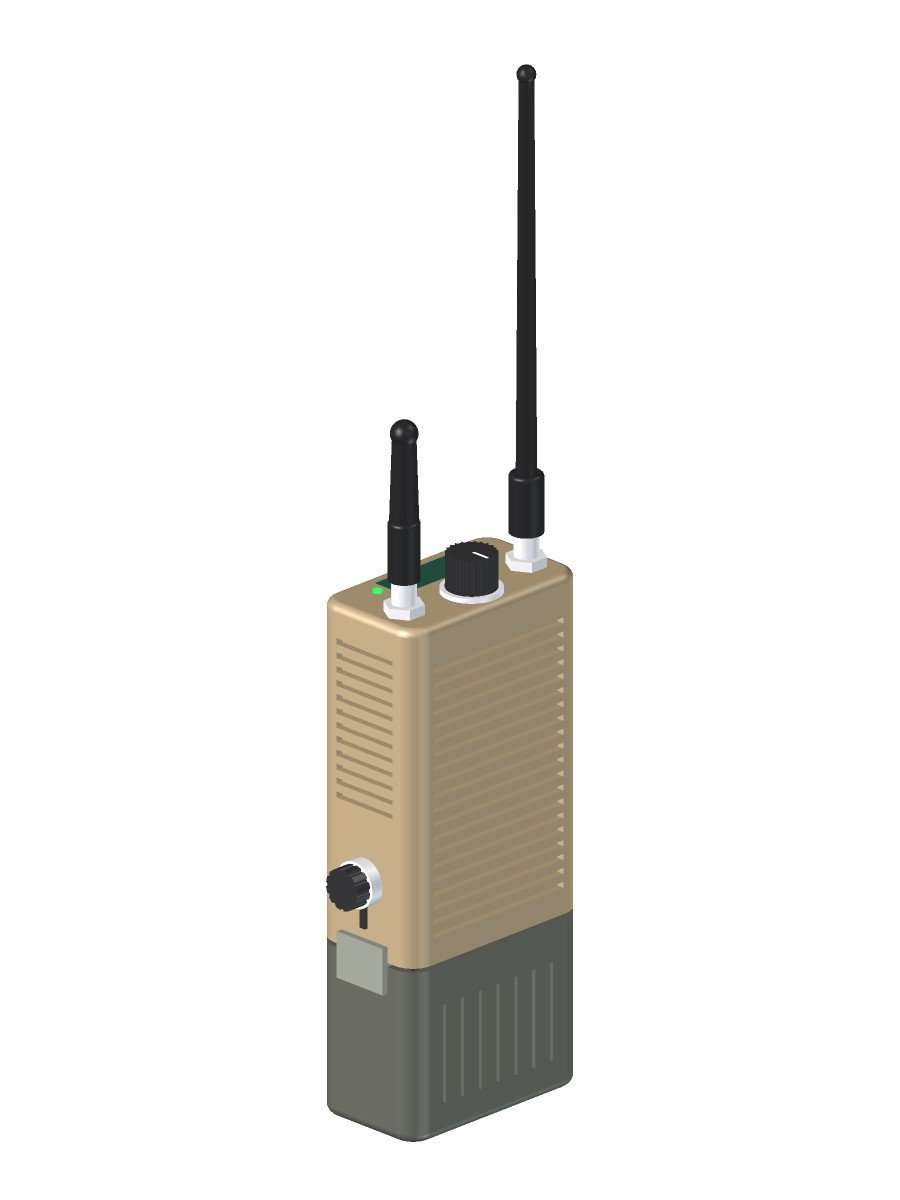
  • The shell is the heatsink. Fins on the back and the right side, with a thermal pad from the CM4 to the inside wall. No fan.
  • Front face stays clean for a label and whatever ends up there once I hold it in my hand.
Front view render of the OpenMANET handheld concept showing the body, antenna layout, channel knob, data port and battery pack proportions

Straight-on front view. The body is about 102 × 67 × 38 mm, roughly SC4200EP-sized.

Top panel: two antennas, a knob and a screen

Everything you touch without looking lives on top.

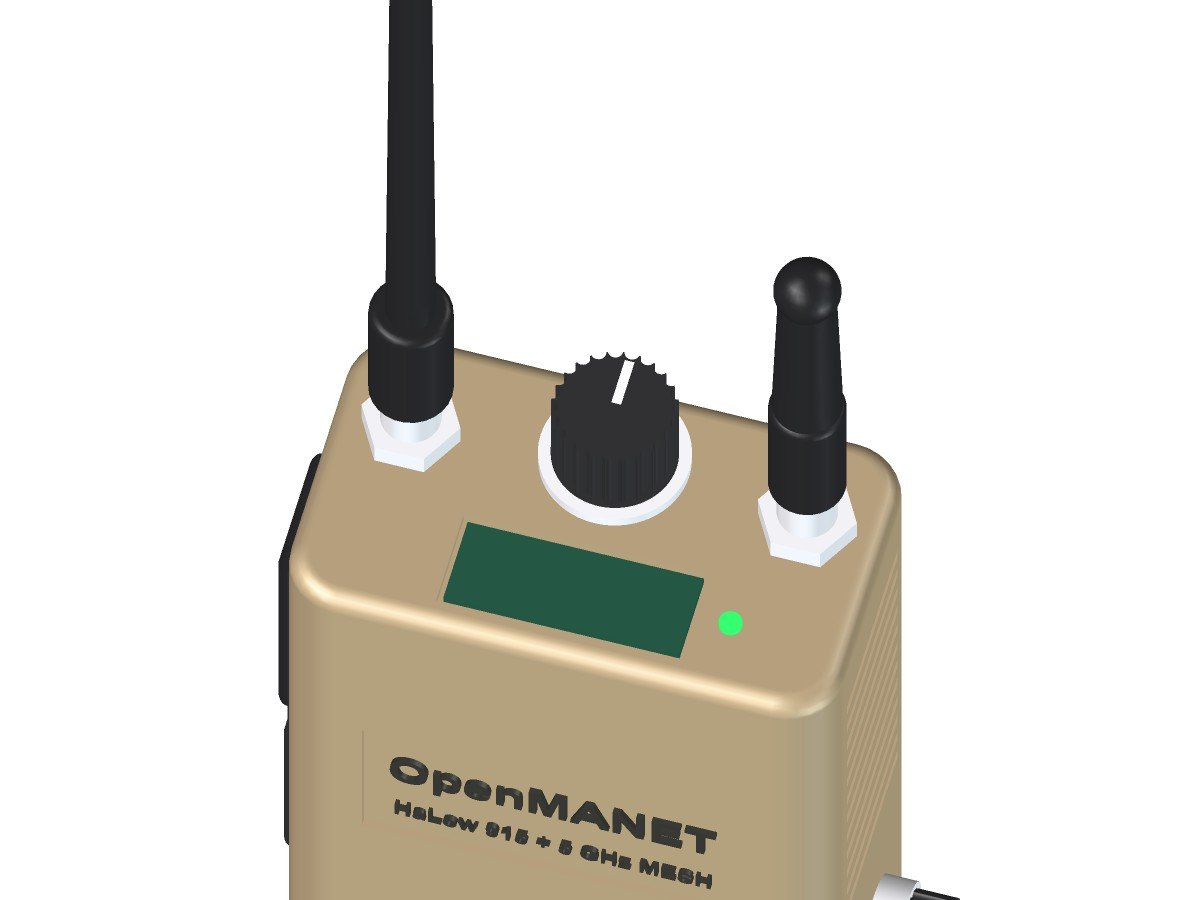
  • Two antenna ports. The tall whip is the 915 MHz HaLow mesh. The stubby one is the 5 GHz radio for the dual-band plan. Both are separate cards inside, not USB dongles.
  • A real channel knob. A detented rotary switch wired straight to GPIO picks the push-to-talk talk group. Click to channel 3, and you’re talking and listening on channel 3. No phone required.
  • A small status screen showing channel, mesh neighbors and signal. It has to be readable in direct sun, in the dark, and dim enough not to bloom under night vision. I haven’t picked the display that does all three yet.
  • A status LED for the at-a-glance “am I on the mesh” check.
Close-up render of the OpenMANET handheld top panel: HaLow and 5 GHz antenna connectors, knurled talk-group channel knob, status screen and status LED

Top panel: two antenna ports, the talk-group knob and a small status screen.

PTT side: push-to-talk and a Kenwood jack

In part 4 I ran push-to-talk from a phone browser. That’s great for testing, but a radio should work with the phone in your pocket.

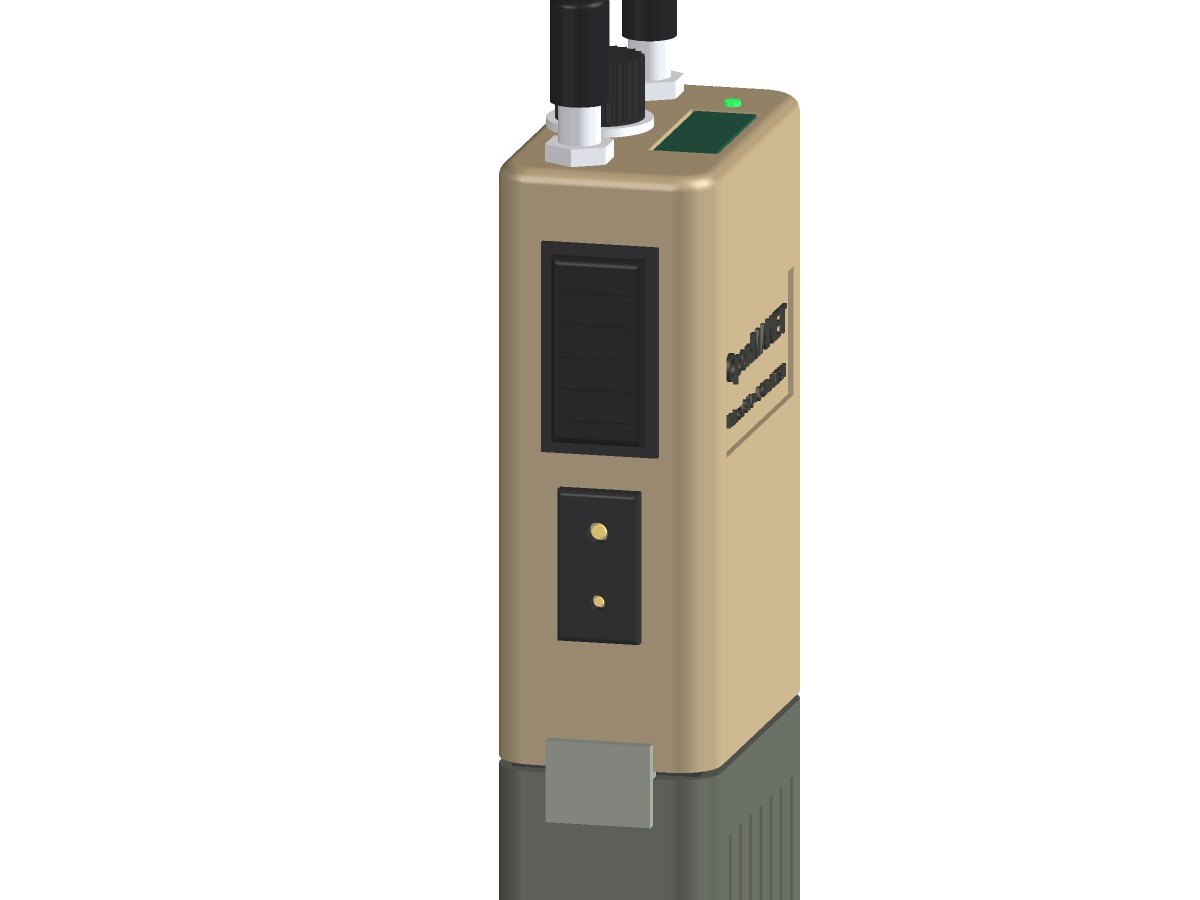
  • A big ribbed PTT bar on the left side where your thumb lands.
  • A Kenwood 2-pin accessory jack under it, so any standard speaker mic or earpiece plugs straight in. I rarely expect to use VOX.
  • Audio and PTT come from the OpenVLM design, the open-source CM108B USB audio board from the OpenMANET community. OpenMANET already auto-detects it, so hardware PTT works with stock software.
Side render of the OpenMANET handheld concept showing the ribbed push-to-talk button and Kenwood 2-pin accessory jack for a shoulder mic or earpiece

PTT side: a big ribbed push-to-talk bar over a Kenwood 2-pin jack for a speaker mic or earpiece.

Back and right side: fins and a data port

The back is all fins. The right side gets fins up high and a capped, sealed data port down low. That port is for the drone detection station: plug it in, and its bearings go out over the mesh as Cursor-on-Target to every ATAK screen.

Rear three-quarter render of the OpenMANET handheld concept showing heatsink fins on the back and right side and the capped data port for the drone DF station

Back side: fins on the back and right side, plus the capped data port for the drone DF station.

The swap-on battery

The whole point of putting the battery on the bottom is to swap it and keep going.

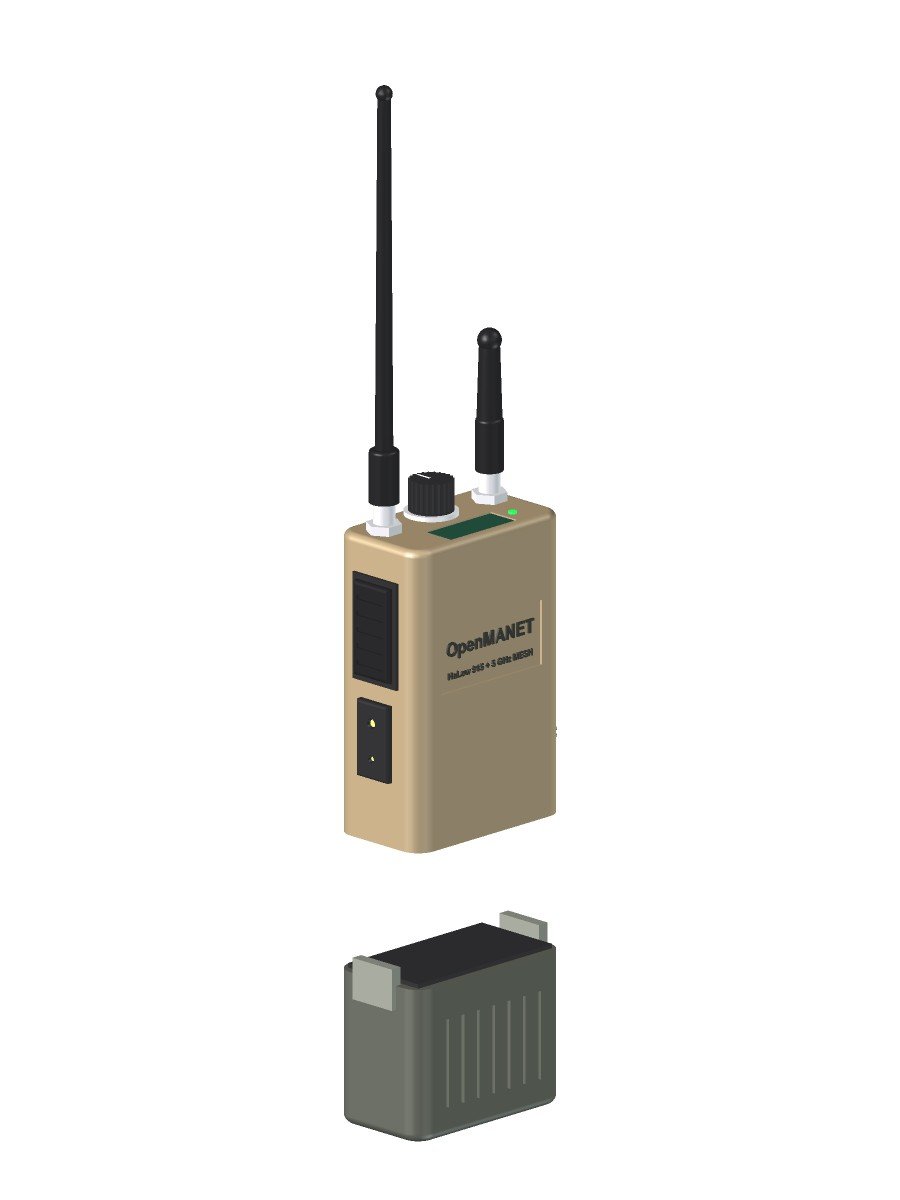
  • A PRC-148/152 (MBITR)-style interface. I’ll buy one adapter kit to learn the geometry, then 3D-print the mating faces on the radio and the pack and only buy the metal contacts from there.
  • Custom 3D-printed battery boxes, not off-the-shelf military batteries, with 21700 cells inside.
  • A small onboard backup cell keeps the radio alive for the few seconds the pack is off.
  • The pack design comes last. Its size and shape follow the body, so this block in the render is a placeholder for the volume.
Exploded render of the OpenMANET handheld concept with the swap-on battery pack pulled off the bottom, showing the MBITR-style mating face and side latches

Battery pack off: an MBITR-style interface on top of a custom 3D-printed pack, with side latches.

What’s inside (planned)

Block Plan
Computer Raspberry Pi CM4 with eMMC, on a custom KiCad carrier board
HaLow radio Gateworks GW16167 (Morse Micro MM8108) on an M.2 E-key slot
5 GHz radio PCIe M.2 card that supports 802.11s mesh (MT7916 family)
Audio / PTT OpenVLM CM108B design, out to the Kenwood 2-pin jack
Controls Rotary talk-group switch on GPIO, PTT, status screen, LED
Power Swap-on 21700 pack, small backup cell, power path on the carrier
Not included 5G modem. Too much heat, power and antenna for a handheld; that lives in the mesh gate or a future vehicle unit.

And a standing rule: encryption stays on. If I ever have to choose between more transmit power and keeping the mesh encrypted, encryption wins.

What these renders don’t settle

  • Real dimensions. The carrier board outline drives the body, so the board comes first.
  • Antenna spacing. Two radios a few centimeters apart on one lid need real isolation testing.
  • Heat. Whether a finned ASA shell can actually carry the CM4’s heat with two radios running is something to measure, not guess.
  • The screen and the exact connector part numbers.

The model is plain FreeCAD Part geometry, built so I can change the numbers and regenerate. These images come straight from FreeCAD’s viewer: no ray tracer, just honest-looking boxes. Next steps are the carrier board in KiCad and a range walk with the bench nodes.

—
TL;DR: I modeled the OpenMANET handheld concept in FreeCAD: SC4200EP-sized finned ASA body, HaLow whip plus 5 GHz stub, a GPIO talk-group knob, a sunlight- and NVG-friendly status screen, side PTT with a Kenwood 2-pin jack, a data port for the DF station, and an MBITR-style swap-on battery. Concept only; the carrier board sets the real size.

My OpenMANET Dual-Band Plan: HaLow + 5 GHz, a CM4 Carrier and a Handheld

In part 1 I got the basics of OpenMANET straight. This one is the plan, and the headline is the OpenMANET dual-band idea: a mesh that runs fast 5 GHz links when nodes are close together and falls back to long-reach 915 MHz HaLow when they drift apart, without the network ever dropping. Plus a handful of other things I want bolted on. Writing it down now so I can see later how far off I was.

Ground rule: stay compatible with stock nodes

I want my radios to join anyone else’s OpenMANET mesh, and theirs to join mine. So everything custom is an add-on on top of the stock firmware, never a fork of the core. For a node to join a mesh, these have to match:

  1. HaLow mesh ID, encryption key, channel and channel width
  2. Country/regulatory settings (the radio’s BCF file), so channels and power line up
  3. A compatible batman-adv version
  4. The stock network model: 10.41.0.0/16, a DHCP scope per node, one mesh gate

Anything I add has to be invisible or harmless to a node that doesn’t know about it. Before I call any custom feature done, it gets tested against an untouched stock node.

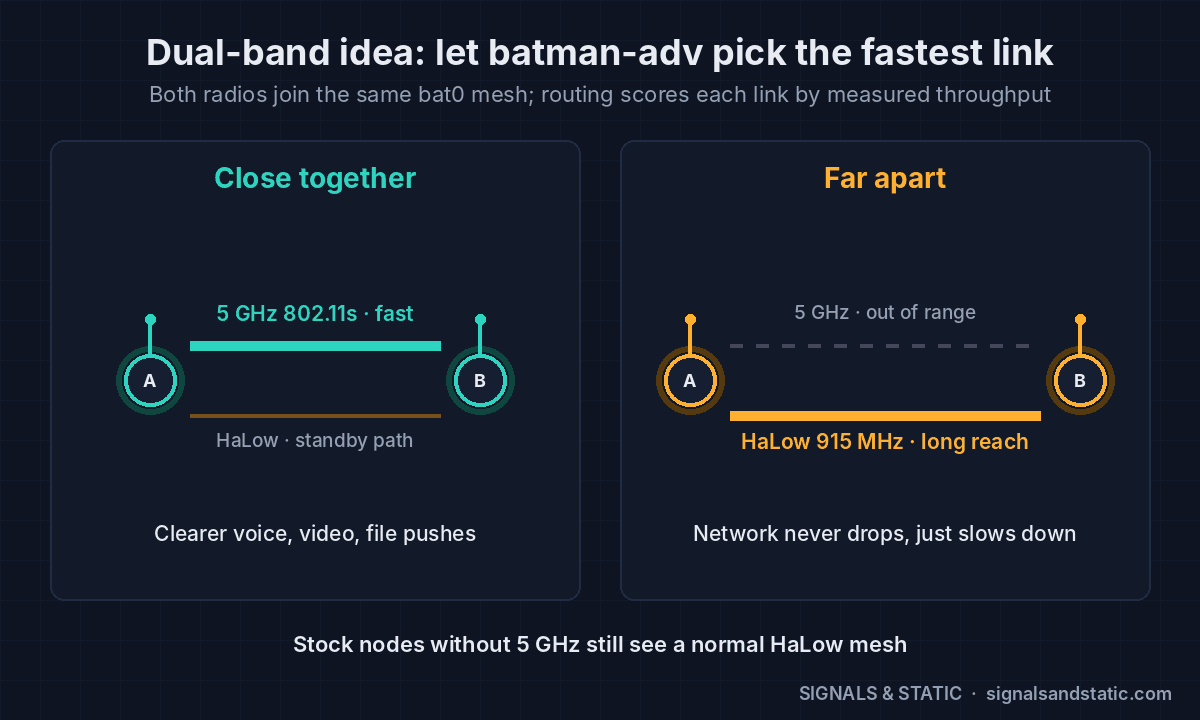
How OpenMANET dual-band works: let batman-adv do it

This turned out to be the easy part, because the mesh stack already supports it. batman-adv can bond several radio interfaces into one mesh. Add a 5 GHz 802.11s interface next to the HaLow one, attach both to the same bat0, and BATMAN_V picks routes by measured throughput.

  • Close together: the 5 GHz hop is way faster, so traffic moves onto it automatically. Clearer voice, video and file pushes.
  • Far apart: 5 GHz falls out of range and traffic falls back to HaLow. The network slows down; it doesn’t drop.
  • Stock nodes without a 5 GHz radio just see a normal HaLow mesh.

RTSP video, ATAK and file transfers get the benefit without knowing anything about it. They ride whichever link batman-adv picks.

OpenMANET dual-band diagram: close together, traffic rides a fast 5 GHz 802.11s link; far apart, batman-adv falls back to 915 MHz HaLow without dropping the mesh

Close in, batman-adv moves traffic onto 5 GHz. Far apart, it falls back to HaLow.

Not every 5 GHz radio can mesh

The radio has to support 802.11s mesh point mode, and a lot of popular cards don’t. Per the OpenMANET docs: the MT7916AED and MT7915DAN work (stability varies with kernel and driver), the QCA6174 works but only one network at a time, and the Intel AX200/AX210 and MT7921 are access-point only.

The Pi 4 only has USB for a second radio, so testing will use a MediaTek mt76-family USB adapter (MT7612U or MT7610U chips). Rule of thumb: shop by chip, not brand. Avoid MT7921-based Wi-Fi 6 sticks and Realtek RTL88xx adapters for mesh work. The final hardware gets a PCIe M.2 card (MT7916) on the CM4 board.

Voice that gets better when you’re close

Here’s the part I haven’t seen anyone else do. OpenMANET’s push-to-talk already uses Opus audio and adapts its error correction when packets drop. My add-on would go the other way: when every listener in a talk group is on a fast link, bump the Opus bitrate up for clearer audio, and drop back the moment anyone isn’t. Opus decoders follow bitrate changes on their own, so stock nodes still hear it fine.

Is anyone else doing this?

Multi-band mesh isn’t a new idea, to be fair:

  • OpenMANET upstream says work is underway to bond HaLow with 2.4 GHz using BATMAN_V. Same mechanism, different band, so I should talk to them before I start rather than duplicate their work.
  • Doodle Labs sells 900 MHz + 2.4 GHz Mesh Rider radios, but the whole mesh switches bands together to dodge interference. One band at a time, not a different band per link.
  • Silvus has a dual-band StreamCaster with a dual-frequency link feature. Proprietary, and military money.

What’s less common in mine is HaLow plus 5 GHz picked per link, voice that improves when nodes are close, and staying fully open and compatible with stock nodes. The adaptive voice piece is a good candidate to contribute back.

The other add-ons

  • 5G mesh gate. One node NATs the whole mesh onto the internet through the Quectel RM520N-GL 5G modem I pulled out of a swap-meet box. Its GNSS can supply that node’s position. On a Pi 4 it needs a USB 3 sled, since the PCIe HAT I was eyeing is Pi 5-only and OpenMANET targets the Pi 4 and CM4.
  • Drone DF link. My drone detection stations would plug into a node’s Ethernet port and publish bearings as Cursor-on-Target, so they show up on every ATAK screen on the mesh. Two stations could share bearings for triangulation over the same mesh. It’s all just IP, so the radio core doesn’t change.

The hardware end state: a CM4 handheld

I’ll admit it: I want it to look like a real tactical radio. The inspiration is something like the Silvus SC4200EP handheld, with a vehicle unit later once the hardware and software settle. I know it’s tacticool. I think they look cool. Moving on.

The CM4 is the same silicon as the Pi 4, so OpenMANET support and power draw carry over, but it exposes a PCIe lane the Pi 4 board doesn’t. A custom carrier board in KiCad could put all of this on one board:

  • CM4 with onboard eMMC (no SD card to shake loose in the field)
  • The HaLow card and a PCIe 5 GHz card on M.2 slots
  • GPS, power management and SMA connectors laid out the way I want
  • A removable battery pack that clips onto the bottom, so I can swap and keep going, plus a small onboard backup cell to stay alive during the swap
  • A PRC-148/152-style battery interface. Plan is to buy one adapter kit to learn the geometry, then 3D-print the radio and battery sides and only buy the metal contacts after that.

No 5G modem in the handheld. Too many antennas, too much heat and power for something you carry. That lives in the mesh gate and maybe the vehicle unit.

The roadmap

  1. Two stock Pi 4 nodes. Learn the system, bench test, range test.
  2. Add 5 GHz. Prove dual-band switching on USB adapters.
  3. 5G mesh gate with the RM520N-GL.
  4. CM4 carrier board in KiCad.
  5. Handheld enclosure in FreeCAD, then the battery packs.
  6. Drone DF link once that project is far enough along.
OpenMANET build roadmap in six steps: stock Pi 4 nodes, 5 GHz, 5G mesh gate, CM4 carrier board, handheld enclosure and drone DF link, with the stay-compatible ground rule

Six phases, one rule: every node has to join anyone’s stock OpenMANET mesh.

Everything in this stack is unlicensed: HaLow and 5 GHz Wi-Fi are Part 15, and the 5G modem rides a carrier’s license. Next up: the phase 1 parts list.

References

—
TL;DR: Bond a 5 GHz radio and the HaLow radio into one batman-adv mesh and routing picks the fast link automatically. Add adaptive voice, a 5G gate and a DF port, then shrink it all onto a CM4 board in a handheld, while staying compatible with stock OpenMANET.